Experiences
Experiences are activities, attractions, and things you plan to do during your trip. They represent the memorable moments that make your journey special.
What is an Experience?
An Experience is any planned activity during your trip, such as:
- Museum visits
- Tours and guided walks
- Park visits
- Outdoor activities
- Sports and recreation
- Shows and performances
- Shopping
- Any other attraction or activity
Creating an Experience
From Day View
- Navigate to a specific day
- Click Add Experience
- Fill in the experience details
- Click Save
From Trip Overview
- Find the day section
- Click Add Experience
- Complete the form
- Save
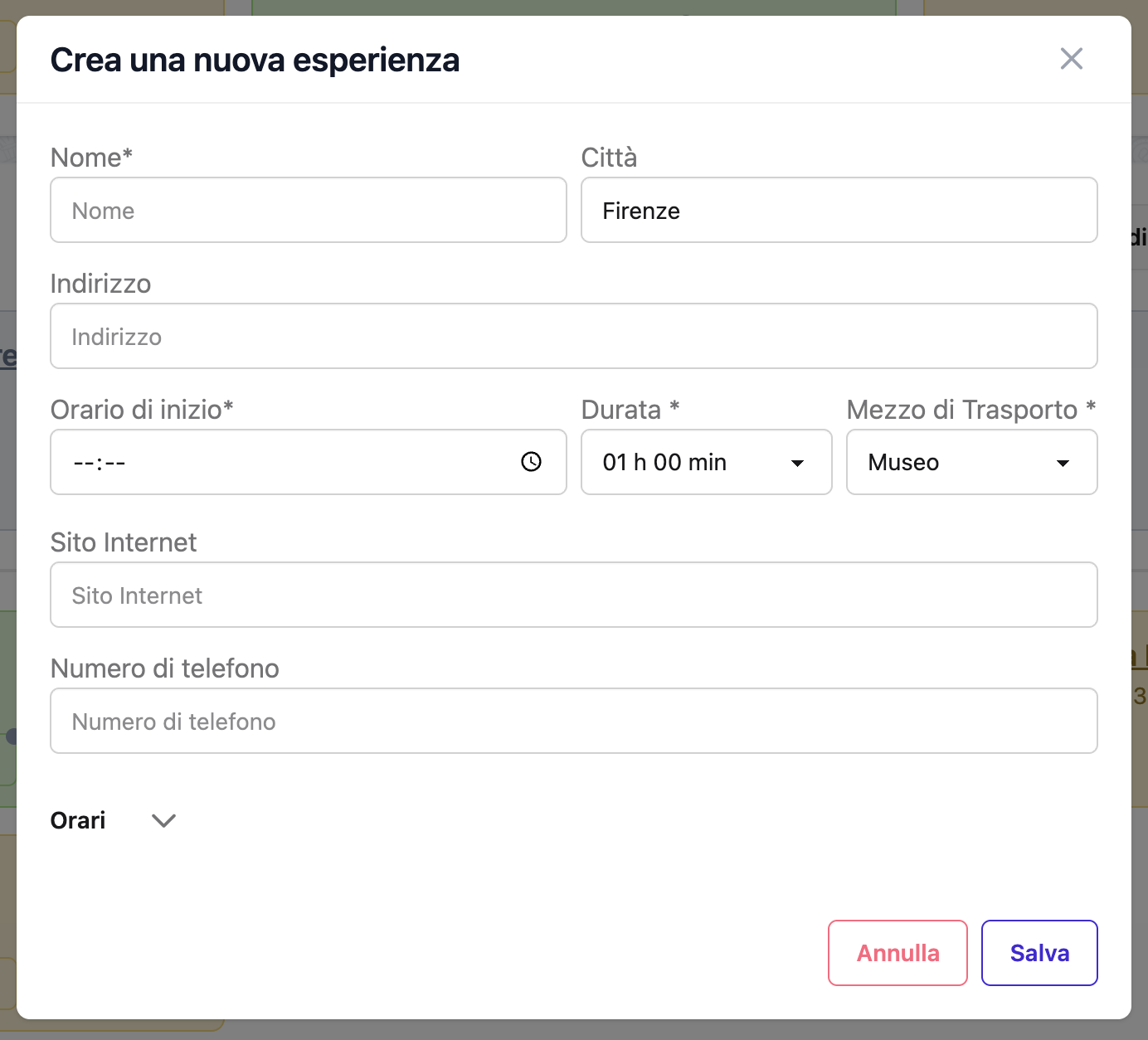 The experience creation form
Experience Fields
Required Fields
Name - The activity or attraction name - Example: "Colosseum Tour", "Louvre Museum", "Seine River Cruise" - Max 100 characters
Optional Fields
Start Time - When the experience begins - Example: 09:30, 14:00, 16:30 - Used for display ordering within the day
Duration - Estimated length of the experience - Dropdown: Not specified, 30 min, 1h, 1h 30min, … up to 7h 30min - Used to estimate end time on the timeline
Tag / Experience Type - A short label to categorise the experience (max 20 characters) - Examples: "Museum", "Walk", "Sport", "Free time" - Autocomplete suggests tags already used in your trips - Shown as a badge on the event card
Address - Location of the experience - Example: "Piazza del Colosseo, 1, 00184 Rome, Italy" - Used for geocoding and map display - Max 200 characters
City - City name - Auto-populated during geocoding - Max 100 characters
Notes - Additional information - Example: "Skip-the-line ticket. Meeting point: main entrance. Bring ID for student discount." - Edited from the event card via the notes modal, separately from the main form - Record booking references, prices, or any other detail here
Day - Which day this experience occurs - Can be left blank to create an "unpaired" experience
Experience Types
Experience types are free-form tags — type any label that fits your trip. Common values:
Museum
- Art galleries
- History museums
- Science centers
- Exhibitions
- Cultural sites
Examples: - "Vatican Museums and Sistine Chapel" - "British Museum" - "MoMA - Modern Art Exhibition"
Park
- National parks
- City parks
- Botanical gardens
- Nature reserves
- Outdoor viewpoints
Examples: - "Central Park Picnic" - "Villa Borghese Gardens" - "Yosemite Hiking Trail"
Walk
- Walking tours (guided or self-guided)
- Historic walks
- Architecture tours
- Neighborhood explorations
Examples: - "Trevi Fountain and Spanish Steps Walk" - "Free Walking Tour - Old Town" - "Street Art Tour - Brooklyn"
Sport
- Hiking
- Cycling
- Water sports
- Skiing/snowboarding
- Adventure activities
Examples: - "Mountain Bike Tour" - "Snorkeling Trip" - "Beach Volleyball"
Other
- Shopping
- Shows/performances
- Classes/workshops
- Spa/wellness
- Anything not fitting other categories
Examples: - "Opera at La Scala" - "Cooking Class - Traditional Pasta" - "Souk Shopping"
Time Management
Ordering Within a Day
Events are displayed in order of their start time. Events without a start time appear after timed ones, sorted by the order you created them.
You can manually reorder events on the day detail page via drag and drop (desktop) or the swap order button (mobile).
Planning Realistic Durations
Set the Duration field to a realistic estimate:
✅ Good practice: - Museum visit: 2–3 hours - Walking tour: 2–4 hours - Park visit: 1–2 hours - Quick shopping: 1 hour - Show/performance: actual duration + 30 min buffer
❌ Over-optimistic: - Major museum: 30 minutes (too short) - Walking tour: 6 hours without breaks - Back-to-back events without travel time
Location and Maps
Geocoding
Enter a complete address to enable: - Map pin display - Distance calculations - Nearby event grouping - Travel time estimates
Best address format:
Piazza del Colosseo, 1
00184 Rome, Italy
Viewing on Map
Experiences appear on: - Day timeline maps - Trip overview maps - Location clustering (multiple events in same area)
Group Nearby Experiences
Plan experiences in the same neighborhood together to minimize travel time.
Google Places Enrichment
Auto-fill experience details using Google Places.
How to Enrich
- Create an experience with a valid address
- Click Enrich button
- System searches Google Places
- Select the correct result
- Details auto-populate:
- Official website
- Phone number
- Opening hours
- Place ID
When to Use Enrichment
✅ Good for: - Popular attractions with Google listings - Museums with official websites - Verified businesses - Places with specific hours
❌ Not useful for: - Self-guided walks - General outdoor activities - Events without fixed locations - Unlisted venues
Managing Experiences
Editing an Experience
- Click on the experience card
- Click Edit
- Modify any fields
- Click Save
Deleting an Experience
- Click on the experience card
- Click Delete
- Confirm deletion
Warning
Deletion is permanent and cannot be undone.
Moving to Another Day
- Edit the experience
- Change the Day field
- Save
The experience moves to the selected day.
Creating Unpaired Experiences
Sometimes you want to plan activities without assigning them to a specific day:
- Create an experience
- Leave Day field blank or set to "None"
- Save
The experience appears in the "Unpaired Events" section. Assign it to a day later when you finalize your schedule.
Best Practices
Research and Planning
✅ Before adding: - Check opening hours - Verify if booking required - Read reviews - Check location on map - Confirm admission prices
Adding Complete Information
Good example:
Name: Colosseum and Roman Forum Tour
Tag: Museum
Start Time: 09:00
Duration: 3h 30min
Address: Piazza del Colosseo, 1, 00184 Rome, Italy
Notes: Skip-the-line combo ticket. Meeting point: main entrance.
       Includes audio guide. Wear comfortable shoes. Bring water.
       Confirmation: COL-TOUR-2025-0314
Incomplete example (harder to use):
Name: Colosseum
Start Time: 09:00
Using Notes Effectively
Great notes include: - Meeting point details - What to bring - Special instructions - Accessibility information - Dress code - Student/senior discounts - Cancellation policy
Example:
Meeting point: Main gate, look for red umbrella guide.
Bring: Passport for student discount, water bottle, sunscreen.
Note: First Sunday of month is free entry but very crowded.
Alternative: Book Thursday evening for fewer crowds.
Balancing Your Day
Don't over-schedule:
❌ Too packed:
08:00-10:00 Museum A
10:30-12:30 Museum B
13:00-15:00 Museum C
15:30-17:30 Museum D
18:00-20:00 Museum E
✅ Well-balanced:
09:00-12:00 Museum A (major attraction)
12:00-13:30 Lunch break
14:00-16:00 Walking tour
16:00-17:00 Free time / café
19:00 Dinner
Special Scenarios
All-Day Experiences
For full-day activities: - Set start time: 09:00 - Set duration to the longest available value (7h 30min) - Note: "Full day tour with lunch included"
Multi-Part Experiences
If an experience has multiple sessions:
Option 1: Create one long experience
Name: Guided City Tour (Morning & Afternoon)
Start Time: 09:00
Duration: 7h 30min
Notes: Lunch break 12:00-13:00 (not included)
Option 2: Create separate experiences
Experience 1: City Tour - Morning Session (Start 09:00, Duration 3h)
Experience 2: City Tour - Afternoon Session (Start 13:00, Duration 4h)
Weather-Dependent Activities
Add contingency notes:
Notes: Outdoor activity. Check weather forecast.
       Backup: Visit museum if raining (see Unpaired Events)
Flexible Timing
For experiences without strict times:
Name: Explore Montmartre Neighborhood
Start Time: 14:00
Duration: 3h (approximate)
Notes: Self-guided exploration. No fixed schedule.
       Visit Sacré-Cœur anytime before 18:00.
Frequently Asked Questions
Can I have multiple experiences at the same time?
Yes, but the system will warn you about time overlaps. This might be intentional (group splitting up) or an error (need to reschedule).
How do I mark an experience as completed?
There is no "completed" status for experiences. Once a trip's dates have passed, the trip itself moves to the Completed (and later Archived) state.
Can I add photos to an experience?
A travel-photo gallery is not currently supported. If you need to attach a ticket scan or a reservation PDF to the experience, use the Documents section instead — see the Documents & Attachments guide.
Can I duplicate an experience?
No built-in duplicate feature yet. You'll need to create a new experience manually.
Can I set recurring experiences?
No, each experience must be created individually. If you have daily activities (e.g., morning run), create one for each day.
How do I handle reservations?
Add reservation details in: - Notes field (confirmation number, time, confirmation email, etc.) - Links section (add reservation URL)
What if I don't know the exact time yet?
Set approximate times and add a note:
Notes: Time TBD - will confirm 1 day before
Update the time once confirmed.
Can I link experiences together?
Not directly. Use notes to reference related experiences:
Notes: Part 1 of Vatican tour. See also "Sistine Chapel" (Day 2)
Related Guides
- Days - Understanding day organization
- Meals - Adding restaurant reservations
- Transfers - Travel between experiences
- Trips - Overall trip management
Next: Learn about adding meals to your itinerary