Transfers
Transfers represent your journey to and from the trip destination - flights, trains, cars, and more. Organize It helps you track arrival and departure, including the connection to your first or last point of the trip.
What is a Transfer?
A Main Transfer is your arrival to or departure from the trip destination (flights, trains, cars to/from the destination). You can also connect a main transfer to your first or last event or stay.
Main Transfers
Main transfers handle your journey to and from the trip destination.
Arrival Transfer
Your journey TO the destination at the start of the trip.
Examples: - Flight from London to Rome - Train from Paris to Barcelona - Driving from home to vacation rental
Departure Transfer
Your journey FROM the destination at the end of the trip.
Examples: - Flight from Rome back to London - Train from Barcelona to Paris - Driving from vacation rental back home
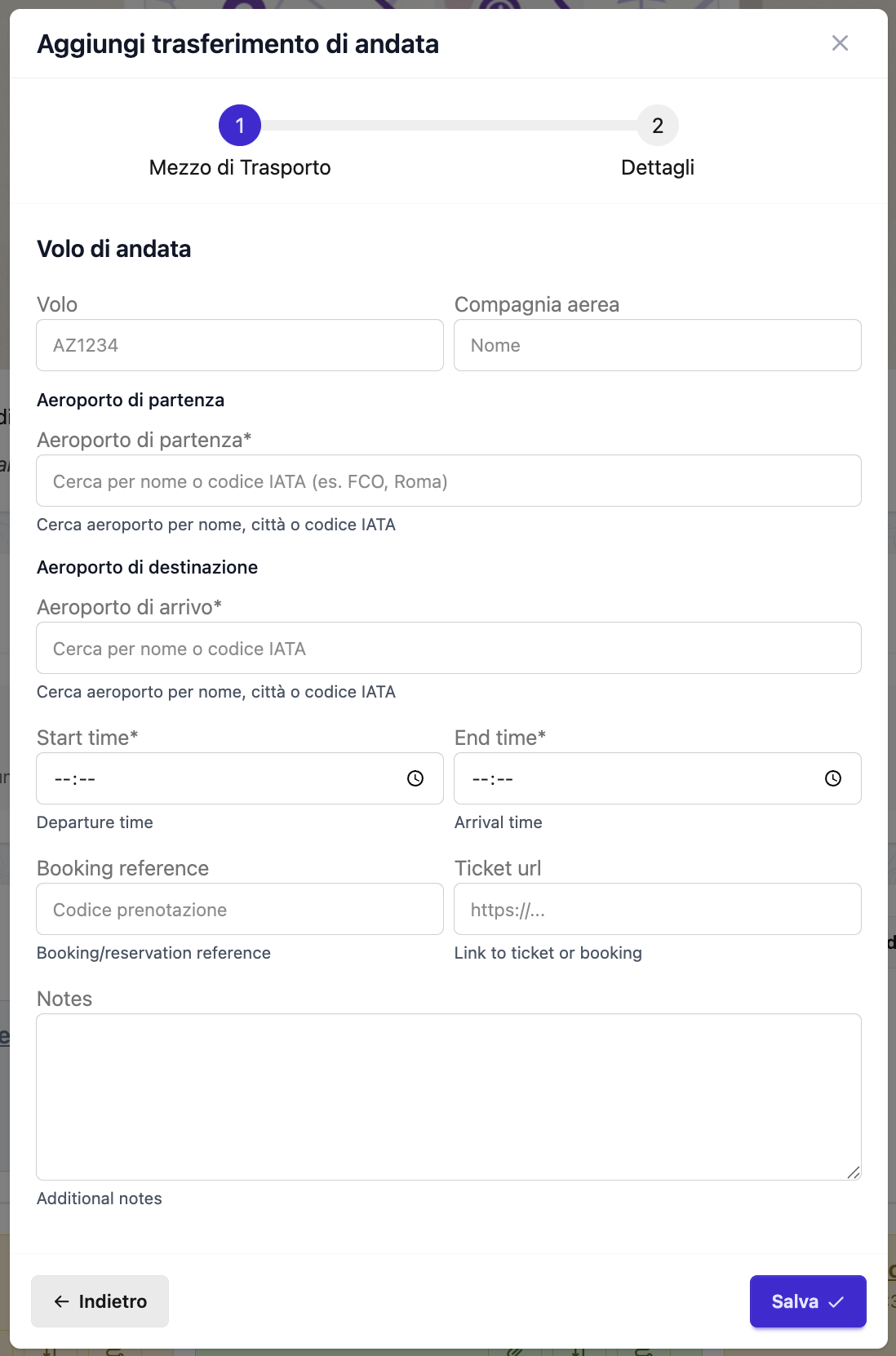 The transfer creation form
Creating a Main Transfer
- Navigate to the trip
- Click Add Transfer → Arrival or Departure
- Fill in transfer details
- Click Save
Main Transfer Fields
Required Fields
Transport Type - Type of transportation - Options: - Plane - Flights, air travel - Train - Rail transport - Car - Personal vehicle, rental car - Other - Bus, boat, etc.
Direction - Arrival - Coming to the destination - Departure - Leaving the destination
Start Time (Departure time) - When you depart from origin - Example: 08:00, 14:30
End Time (Arrival time) - When you arrive at destination - Example: 11:30, 18:45
Origin and Destination
For Plane and Train: - Origin Code - IATA code (plane) or station ID (train) - Example: LHR, FCO, NYP, GCT - Origin Name - Airport/station full name - Example: "London Heathrow", "Rome Fiumicino" - Destination Code - IATA code or station ID - Destination Name - Airport/station full name
For Car and Other: - Origin Location - Full address or place name - Destination Location - Full address or place name
Quick-fill suggestions
When creating a car transfer, the form shows quick-fill buttons below the destination field. For arrival transfers, suggestions come from Day 1 stays and experiences. For departure transfers, suggestions come from the last day stays and experiences. Click any button to instantly fill the address field.
Home address pre-fill
If you set a Home address in your profile, the form will automatically pre-fill the origin field (for arrivals) or destination field (for departures) with your home address.
Optional Fields
Notes - Additional details - Example: "Seat 12A. Check-in opens 24h before. Baggage: 1x23kg included."
Train Number (trains only, optional) - The train service number (e.g., "FR9619", "2822") - Used to check live train status via viaggiatreno on the day of travel - If left empty, the train status button will show the departure board for the origin station instead
Flight Number (flights only, optional) - The flight number (e.g., "BA500", "AZ610") - Used to check live flight status via FlightAware on the day of travel
Type-Specific Data (JSON field for flexibility) - Terminal details - Any other transport-specific information
Main Transfer Examples
Flight Arrival
Type: Plane
Direction: Arrival
Origin: LHR (London Heathrow)
Destination: FCO (Rome Fiumicino)
Departure Time: 08:00
Arrival Time: 11:30
Flight Number: BA500
Notes: Seat 12A. Terminal 5. Check-in online 24h before. 1x23kg baggage included.
Type-Specific Data:
  - terminal: 5
Train Arrival
Type: Train
Direction: Arrival
Origin: Gare de Lyon (Paris)
Destination: Milano Centrale (Milan)
Departure Time: 14:15
Arrival Time: 21:25
Train Number: 9426 (optional, for live status check)
Notes: Night train. Sleeper cabin #12. Platform 3.
Searching for tickets
Use the Search on Trainline and Search on Trenitalia buttons in the train form to open the respective booking sites in a new tab.
Car Departure
Type: Car
Direction: Departure
Origin Location: Piazza del Duomo 1, Florence, Italy
Destination Location: Via Roma 10, Milan, Italy (pre-filled from home address)
Departure Time: 10:00
Arrival Time: 16:00
Notes: 6-hour drive. Stop for lunch halfway.
Flight Transfer Features
Flight Status Button
Each flight transfer card shows a Flight status button in the detail view.
When is the button active?
The button is only active on the day of travel:
- Arrival transfer → active on the trip start date
- Departure transfer → active on the trip end date
On all other days the button is greyed out.
What does the button show?
| Flight number set? | Button label | Opens |
|---|---|---|
| Yes | Flight status | Live status page for that specific flight on FlightAware |
| No | Button hidden | — |
The redirect opens FlightAware with the specific flight number. An internet connection is required at travel time.
Train Transfer Features
Booking Search Buttons
The train transfer form includes two quick-access buttons:
- Search on Trainline - Opens trainline.com in a new tab
- Search on Trenitalia - Opens trenitalia.com in a new tab
These buttons are always visible in the form and open in a new tab so you don't lose your work.
Train Status Button
Each train transfer card shows a Train status (or Station departures) button in the detail view.
When is the button active?
The button is only active on the day of travel:
- Arrival transfer → active on the trip start date
- Departure transfer → active on the trip end date
On all other days the button is greyed out. This is intentional: live train information is only meaningful on the actual travel day.
What does the button show?
| Train number set? | Button label | Opens |
|---|---|---|
| Yes | Train status | Live status page for that specific train on viaggiatreno |
| No | Station departures | Departure board for the origin station on viaggiatreno |
The redirect uses the viaggiatreno mobile site. An internet connection is required at travel time.
Main Transfer Connections
After you arrive at your destination (airport, train station) or before departing, you need to get from/to your first/last event or accommodation. Main Transfer Connections simplify this by creating a quick link between your main transfer and your first/last destination.
What is a Main Transfer Connection?
A Main Transfer Connection is a special type of transfer that links:
- For Arrival: Main transfer destination → First event or stay
- For Departure: Last event or stay → Main transfer origin
This helps you plan the "last mile" of your arrival and the "first mile" of your departure.
When to Use Main Transfer Connections
Arrival Connection - Create when: - You need to get from airport/station to your first hotel - You want to go directly from arrival to your first activity - You need to track transport from arrival point to first destination
Departure Connection - Create when: - You need to get from your last hotel to the airport/station - Your last activity is not near the departure point - You want to plan the journey to your departure transport
Example Scenarios:
Arrival:
Rome Fiumicino Airport → Hotel Forum Roma (first stay)
- Connection: Train + Metro, 45 minutes

Departure:
Hotel Brunelleschi (last stay) → Florence SMN Station
- Connection: Walking, 15 minutes
Creating a Main Transfer Connection
- Navigate to the trip
- Ensure you have created:
- A main transfer (arrival or departure)
- At least one event or stay
- In the Main Transfers section, find your arrival/departure
- Click Add Connection button
- Select destination (event or stay)
- Choose transport mode
- Add optional notes
- Save
Main Transfer Connection Fields
Transport Mode - How you're traveling from/to the main transfer - Options: - Driving - Taxi, rental car, Uber - Walking - Short distances on foot - Bicycling - Bike, e-scooter rental - Transit - Metro, bus, train, shuttle
Notes (Optional) - Additional details about the connection - Example: "Airport Express train to Termini, then Metro Line B to Colosseo. Total: 45 min. Train every 15 min."
Main Transfer Connection Examples
Arrival - Airport to Hotel
Main Transfer: Flight BA500 (LHR → FCO)
Destination: Hotel Forum Roma (first stay)

Connection:
Transport Mode: Transit
Notes: Leonardo Express train to Roma Termini (32 min, €14).
       Metro Line B from Termini to Colosseo (8 min).
       Walk to hotel (5 min).
       Total journey: ~45 minutes
       Train runs every 15 min, 6:23 AM - 11:23 PM
Arrival - Airport to First Activity
Main Transfer: Flight AF1234 (CDG → FCO)
Destination: Colosseum Tour (first event, 2:00 PM)

Connection:
Transport Mode: Driving
Notes: Pre-booked taxi from Fiumicino to Colosseum.
       Fixed rate €48. Driver: Marco +39 123 456 7890
       Journey: ~40 minutes (traffic dependent)
       Meeting point: Arrivals Terminal 3
Departure - Hotel to Airport
Last Stay: Hotel Brunelleschi (Florence)
Main Transfer: Flight to London (departure 4:00 PM)

Connection:
Transport Mode: Walking
Notes: 15-minute walk from hotel to Firenze SMN station.
       Then taxi to airport (20 min, ~€25-30)
       Taxi stand outside main station entrance
       Allow 1 hour total for connection
Departure - Last Activity to Station
Last Event: Farewell Lunch at Trattoria Mario (12:00 PM)
Main Transfer: Train to Milan (departure 3:30 PM)

Connection:
Transport Mode: Walking
Notes: 20-minute walk from restaurant to Firenze SMN.
       Scenic route through San Lorenzo market
       Arrive station by 3:00 PM for check-in
Managing Connections
Editing a Connection: 1. Click on the connection in the Main Transfers section 2. Modify transport mode or notes 3. Save
Deleting a Connection: 1. Click Edit on the connection 2. Click Delete 3. Confirm deletion
Changing Destination: - Delete the existing connection - Create a new connection with different destination
Best Practices
For Arrival Connections:
✅ Always allow buffer time: - International flights: 90-120 min for customs + baggage - Domestic flights: 45-60 min for baggage claim - Trains: 15-30 min to exit station - Add 30% extra for delays/unfamiliarity
✅ Consider luggage: - Walking with bags? Keep it short (<15 min) - Heavy luggage? Choose taxi/Uber over public transit - Multiple bags? Pre-book transport
✅ Research transport options: - Check if airport/station shuttles available - Compare: taxi vs. public transit vs. rental car - Note operating hours (late night arrivals?)
For Departure Connections:
✅ Work backwards from departure time:
Flight departure: 4:00 PM
Recommended arrival: 1:00 PM (3h before intl flight)
Connection duration: 45 min (hotel to airport)
Must leave hotel by: 12:15 PM (with buffer)
✅ Plan for worst case: - Traffic delays (morning/evening rush hour) - Getting lost or taking wrong turn - Waiting for taxi/transport - Add 50% buffer for departures
✅ Verify transport availability: - Does metro run early enough? - Is taxi available at that hour? - Should you pre-book?
Notes Content:
Include in connection notes: - Exact route/line numbers (Metro Line B, Bus 64) - Duration for each segment - Ticket prices - Operating hours/frequency - Backup options if primary fails - Contact numbers for pre-booked transport - Meeting points/pickup locations
Tips
Don't Overthink It
Only create connections if they require planning. If you're taking a taxi from airport to hotel, a simple note in the main transfer may be enough.
First Stay vs. First Event
Usually connect to your first stay (accommodation). Only connect to first event if you're going directly to an activity before checking in.
Use for Complex Connections
Most useful when the connection involves: - Multiple transport modes (train + metro + walk) - Pre-booking required - Specific timing constraints - Unfamiliar routes in foreign cities
Transport Modes
Driving
- Personal car
- Rental car
- Taxi/Uber/Lyft
- Private driver
Best for: Long distances, multiple stops, heavy luggage, groups
Walking
- On foot
- Short distances
Best for: Nearby locations (<20 min walk), sightseeing along the way, good weather
Bicycling
- Bicycle
- E-bike
- Scooter rental
Best for: Medium distances, bike-friendly cities, avoiding traffic
Transit
- Metro/subway
- Bus
- Tram
- Local trains
- Ferry
Best for: Cities with good public transport, avoiding parking, budget-friendly
Managing Transfers
Editing a Transfer
- Click on the transfer
- Click Edit
- Modify fields
- Save
Deleting a Transfer
- Click on the transfer
- Click Delete
- Confirm deletion
Warning
Deleting a transfer is permanent.
Viewing on Maps
Transfers with location data appear on: - Day timeline maps - Trip overview maps - Route visualization (from → to)
Best Practices
Main Transfers Planning
✅ Always include: - Arrival and departure transfers - Departure and arrival times - Flight/train number (for live status lookup) - Check-in requirements - Baggage allowances
Example checklist:
✓ Flight booked
✓ Flight number recorded (for FlightAware status)
✓ Seats selected
✓ Online check-in reminder (24h before)
✓ Baggage rules noted
✓ Airport parking/transport arranged
Buffer Time
Leave adequate time between:
After arrival transfer: - Customs/immigration (international): 60-90 min - Baggage claim: 30-45 min - Transport to hotel: Variable - Buffer before first event: 2-3 hours minimum
Before departure transfer: - International flights: Arrive 3 hours early - Domestic flights: Arrive 2 hours early - Trains: Arrive 30-45 min early - Last event should end: 4-5 hours before flight
Between stays: - Allow time for checkout (hotel may hold bags) - Travel time + 30% buffer - Time before check-in (store bags if early)
Notes Best Practices
For flights, include:
Flight: BA500 (fill in the dedicated field for live status)
Departure: Terminal 5, Gate opens 1h before
Seat: 12A (window)
Baggage: 1x23kg checked, 1x10kg carry-on
Check-in: Online 24h before
For trains, include:
Train: Freccia Rossa #9352
Train Number: 9352 (fill in the dedicated field for live status)
Platform: TBD (check 20 min before)
Seat: Coach 5, Seat 22A
Booking: TRENITALIA-123456
Simple Transfer Planning
Don't create transfers for: - ❌ Events in the same building - ❌ Adjacent locations (<2 min walk) - ❌ Very obvious connections
Do create transfers for: - ✅ Different neighborhoods - ✅ Transport requiring tickets/booking - ✅ Routes needing specific instructions
Time Calculations
Estimating Transfer Duration
Walking: ~5 km/h (3 mph) - 1 km = ~12 minutes - 1 mile = ~20 minutes
Driving (city): ~30 km/h (20 mph) with traffic - 5 km = ~10 minutes - 3 miles = ~10 minutes
Metro/Transit: Variable - Check specific routes - Add waiting time (5-10 min) - Add walk to/from stations
Taxi/Uber: Similar to driving - Add wait time for pickup (5-15 min)
Add 30% Buffer
Always add extra time for unexpected delays, getting lost, or slow travel.
Frequently Asked Questions
Can I have multiple arrival/departure transfers?
Each trip can have one arrival and one departure transfer. If you have multiple flights (with connections), add connection details in notes.
How do I handle flight connections?
Add connection details in the notes:
Notes: LHR → FCO (direct)
       Connection option: Change at CDG
       If delayed, backup flight: BA502 (2 hours later)
Should I add transfers for every movement?
No. Only add transfers when: - Different locations/neighborhoods - Specific transport needed - Time/route planning important
Skip for: - Same building - Adjacent locations - Obvious walking routes
How do I handle rental cars?
Pickup:
Type: Car (Rental)
Direction: Arrival (if part of arrival)
Notes: Enterprise Rent-A-Car. Pickup at airport.
       Confirmation: ENT-123456. Full insurance included.
       Return: Day 7, same location.
Return: Include in departure transfer notes or create separate event.
Can I attach tickets/confirmations?
Yes. You can attach up to 2 PDFs or images (max 2 MB each) — boarding passes, train tickets, e-tickets — to each main transfer from the Documents card on the trip page. See the Documents & Attachments guide.
Additional options: - Add Ticket URL (car and other transfers) for e-tickets - Use trip Links section for booking pages - Store confirmation numbers in notes
How do I track multi-leg journeys?
Option 1: One transfer with detailed notes
Notes: Multi-leg journey:
       1. Train: Rome → Florence (2h)
       2. Change in Florence (1h wait)
       3. Train: Florence → Venice (2h)
       Total: 5 hours
Option 2: Separate events for each leg (if staying overnight between)
Related Guides
- Stays - Managing accommodations
- Days - Organizing daily schedules
- Experiences - Planning activities
- Trips - Trip overview
Next: Visit the FAQ section for common questions