Meals
Meals represent dining experiences during your trip - from quick breakfasts to fine dining dinners. Plan restaurant reservations, local food experiences, and culinary adventures.
What is a Meal?
A Meal is any dining event during your trip, including:
- Restaurant reservations
- Café visits
- Street food experiences
- Picnics
- Food tours
- Cooking classes
- Bar/cocktail venues
Creating a Meal
From Day View
- Navigate to a specific day
- Click Add Meal
- Fill in the meal details
- Click Save
From Trip Overview
- Find the day section
- Click Add Meal
- Complete the form
- Save
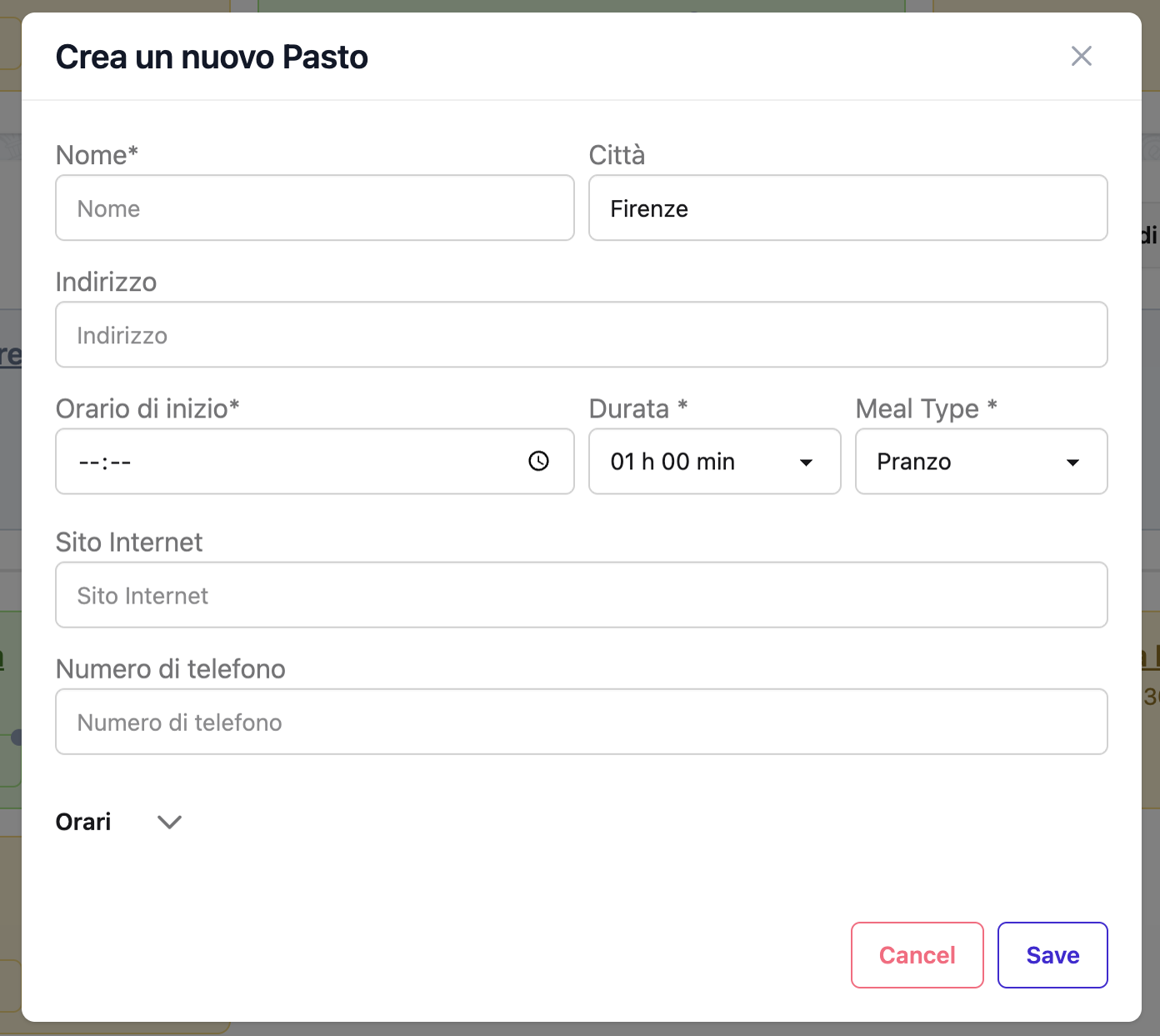 The meal creation form
Meal Fields
Required Fields
Name - Restaurant or dining location name - Example: "Trattoria da Enzo", "Le Bernardin", "Street Food Tour" - Max 100 characters
Meal Type - Type of meal - Options: - Breakfast - Morning meal (7:00–11:00 typical) - Lunch - Midday meal (12:00–15:00 typical) - Dinner - Evening meal (18:00–23:00 typical) - Snack - Quick bites, coffee, dessert - Shown as a badge on the event card
Optional Fields
Start Time - Reservation or planned dining time - Example: 12:30, 19:00, 20:30 - Used for display ordering within the day
Duration - Estimated length of the meal - Dropdown: Not specified, 30 min, 1h, … up to 7h 30min - Typical values: 30–60 min for breakfast/snack, 1–2 h for lunch, 1.5–3 h for dinner
Address - Restaurant location - Example: "Via dei Vascellari, 29, 00153 Rome, Italy" - Enables map display and directions - Max 200 characters
City - City name - Auto-populated during geocoding - Max 100 characters
Notes - Additional information - Example: "Try the cacio e pepe. Cash only. No reservation needed. Ask for outdoor seating." - Edited from the event card via the notes modal, separately from the main form - Record reservation confirmations, approximate price, or any other detail here
Website - Restaurant website or booking link - Auto-filled via Google Places enrichment
Phone Number - Restaurant contact number - Auto-filled via Google Places enrichment - Useful for calling ahead
Day - Which day this meal occurs - Can be left blank to create an "unpaired" meal
Meal Types
Breakfast
Typical times: 07:00 - 11:00
Examples: - "Hotel Breakfast Buffet" - "Café de Flore - Croissants" - "Local Bakery - Fresh Pastries"
Duration: 30 minutes - 1 hour
Tips: - Check if hotel includes breakfast - Note opening times for cafés - Consider grab-and-go for busy mornings
Lunch
Typical times: 12:00 - 15:00
Examples: - "Roscioli - Deli Lunch" - "Pizzarium - Pizza al Taglio" - "Picnic in Central Park"
Duration: 1 - 2 hours
Tips: - Popular spots fill up 12:30-13:30 - Some European restaurants close 14:30-15:00 - Consider time between morning and afternoon activities
Dinner
Typical times: 18:00 - 23:00
Examples: - "La Pergola - Fine Dining" - "Osteria Francescana - Tasting Menu" - "Night Market - Street Food"
Duration: 1.5 - 3 hours (fine dining may take longer)
Tips: - Book reservations well in advance for popular restaurants - Check dress codes for upscale venues - European dinners often start later (20:00-21:00)
Snack
Typical times: Anytime
Examples: - "Gelato at Giolitti" - "Coffee Break - Café Terrace" - "Afternoon Tea - Hotel Lounge" - "Tapas Bar Hopping"
Duration: 30 minutes - 1 hour
Tips: - Use for breaks between activities - Great for trying local specialties - Can be flexible timing
Making Reservations
When to Reserve
✅ Always reserve for: - Fine dining restaurants - Michelin-starred venues - Popular tourist area restaurants - Large groups (4+ people) - Weekend/holiday dining - Special occasions
⚠️ Maybe reserve for: - Moderate restaurants during peak season - Lunch at busy spots - Specific seating requests (outdoor, window, etc.)
❌ Usually no reservation needed: - Casual cafés - Fast food/takeaway - Street food - Markets - Breakfast at hotel
Reservation Information to Record
When you make a reservation, note: - Confirmation number - Contact name (who you spoke with) - Table preferences (outdoor, quiet area, etc.) - Deposit (if paid) - Cancellation policy - Special requests (dietary restrictions, celebration, etc.)
Example note:
Reservation confirmed for 4 people at 20:00.
Confirmation: RESY-2025-0314
Outdoor table requested. €50 deposit paid (non-refundable).
Mentioned celebrating anniversary - they'll prepare something special.
Contact: Maria (reservations) +39 123 456 7890
Location and Maps
Geocoding
Complete addresses enable: - Map pin display - Walking directions from previous event - Distance calculations - Grouping nearby venues
Good address:
Via dei Vascellari, 29
00153 Rome, Italy
Finding Restaurants Nearby
Plan meals near your other activities: - Check map clustering - Note walking time from morning experience - Consider transit time to evening plans
Reduce Travel Time
Group meals near other events in the same area to minimize travel.
Google Places Enrichment
Auto-populate restaurant details using Google Places.
What Gets Enriched
- Official website
- Phone number
- Opening hours (kitchen times)
- Google Place ID
- Additional business info
How to Enrich
- Enter restaurant name and address
- Click Enrich button
- Select correct result from search
- Details auto-fill
When Enrichment Helps
✅ Useful for: - Established restaurants with Google listings - Chains with verified info - Popular tourist-area restaurants
❌ Less useful for: - Small local spots without listings - Street food vendors - Pop-up restaurants - Home dining experiences
Managing Meals
Editing a Meal
- Click meal card
- Click Edit
- Update fields
- Save
Deleting a Meal
- Click meal card
- Click Delete
- Confirm
Warning
Deletion is permanent.
Moving to Another Day
- Edit the meal
- Change Day field
- Save
Unpaired Meals
Create meals without assigning to a day: 1. Leave Day blank 2. Save to "Unpaired Events" 3. Assign to a day later when schedule is finalized
Use cases: - Researching restaurant options - Tentative reservations - Backup plans if primary restaurant is full
Best Practices
Realistic Timing
Breakfast: 30–60 minutes
Start Time: 08:00
Duration: 1h
Casual lunch: 1–1.5 hours
Start Time: 12:30
Duration: 1h 30min
Fine dining: 2–3 hours
Start Time: 20:00
Duration: 3h
Add Buffer Time
Allow extra time for: - Waiting for table (even with reservation) - Slow service (especially outside peak hours) - Enjoying the experience without rushing
Using Notes Effectively
Great notes include:
Signature dish: Cacio e pepe
Reservation: Table 12, outdoor terrace
Dress code: Smart casual (no shorts)
Payment: Cash only, ATM nearby
Dietary: Mentioned vegetarian options needed
Backup: If full, try "Taverna Trilussa" next door
Dietary Restrictions
Record dietary needs: - Add to notes when booking - Confirm with restaurant in advance - Research menu beforehand - Have backup restaurants with suitable options
Example:
Notes: Confirmed gluten-free pasta available.
       Spoke with chef about celiac requirements.
       Dedicated prep area. Menu code: GF-OPTIONS
Budgeting
Track meal costs to manage budget:
| Type | Budget Range |
|---|---|
| Street food | €5-10 |
| Casual café | €10-20 |
| Mid-range restaurant | €25-50 |
| Fine dining | €75-150+ |
| Michelin-starred | €150-400+ |
Special Meal Scenarios
Food Tours
Name: Trastevere Food Tour
Type: Dinner
Time: 18:00 - 21:00
Notes: Walking food tour. Multiple stops.
       Includes: Pizza, supplì, gelato, wine tasting
       Meeting point: Piazza Santa Maria
       Wear comfortable shoes.
Multi-Course Tasting Menus
Name: Osteria Francescana - Tasting Menu
Type: Dinner
Time: 19:30 - 23:00 (12-course menu, allow 3+ hours)
Notes: €350 per person. Wine pairing +€150
       Dress code: Formal
       Confirmed dietary restrictions with chef
Picnics
Name: Picnic in Borghese Gardens
Type: Lunch
Time: 12:00 - 13:30
Address: Villa Borghese, Rome
Notes: Buy supplies from Roscioli beforehand
       Bring: Blanket, wine opener, napkins
       Spot: Near Pincio Terrace for views
Hotel Dining
Name: Hotel Breakfast Buffet
Type: Breakfast
Time: 07:30 - 08:30
Notes: Included in room rate. 7:00-10:00 service.
       Get there early (before 8:30) to avoid crowds.
Tips for Different Cuisines
Italian Restaurants
- Lunch: 12:30-15:00, Dinner: 19:30-23:00
- "Coperto" (cover charge) is normal
- Dress nicely even for casual spots
- Coffee is espresso, ordered after meal
Japanese Restaurants
- Omakase needs advance booking
- Sushi bar seating for best experience
- No tipping in Japan
- Reservations via hotel concierge often easier
French Restaurants
- Lunch: 12:00-14:00, Dinner: 19:00-22:00
- "Menu" = fixed-price meal
- Water: Specify "carafe d'eau" for tap (free)
- Service included in bill
Frequently Asked Questions
Can I add meals without reservations?
Yes! Add any dining plan, with or without reservations. Use the notes to track which meals are confirmed.
How do I handle walk-in restaurants?
Add them to your itinerary with a note:
Notes: No reservation (walk-in only). Arrive early (before 12:00) or late (after 14:00) to avoid waits.
What if a restaurant is fully booked?
Keep in your unpaired events as backup:
Notes: BACKUP OPTION if first choice is full.
       Similar cuisine, same area.
Can I link multiple restaurants for one meal?
Create separate meal entries:
Meal 1: Tapas Bar A (19:00-20:00)
Meal 2: Tapas Bar B (20:30-21:30)
Notes: Bar hopping night - multiple venues
How do I handle food delivery or takeaway?
Add as a meal:
Name: Pizza Delivery to Hotel
Type: Dinner
Time: 19:00 - 19:30
Notes: Deliveroo app. Order from: Pizzeria Bonci
       Room service not allowed, eat in lobby lounge
Should I include hotel breakfast?
Yes, if it's part of your daily routine:
Name: Hotel Breakfast
Type: Breakfast
Time: 08:00 - 08:45
Notes: Included in room. Buffet style. Good coffee!
Related Guides
- Experiences - Combine food tours with experiences
- Days - Plan meals within your daily schedule
- Transfers - Travel between restaurant and other events
- Stays - Note which stays include breakfast
Next: Learn about managing transfers and transportation